



Lets Walk Through it
Once you login, It's the start of a productive day
Your home screen brings together everything you need—projects, assignments, and deadlines—helping you stay focused and organized from the start.


Each user has a personalized home screen that shows only the projects they have access to, along with their specific tasks. You can also keep key projects and updates easily accessible on the homepage

As a HR recruiter, this platform simplifies managing my recruitment projects.
The project board helps stay on top of every stage, from candidate sourcing to onboarding, while the file manager ensures employee and company documents are securely stored and easily shared with teams.

Micaela Hudson
HR Recruiter
A project is the hub where tasks, discussions, deliverables, and decisions come together. It keeps everything—and everyone—organized in a clear, structured space.


Task overview card provides you with a snapshot of task progress, deadlines, and priorities all in one place.
Keep discussions relevant and focused by commenting directly within tasks. This feature ensures ideas, feedback, and questions stay organized.
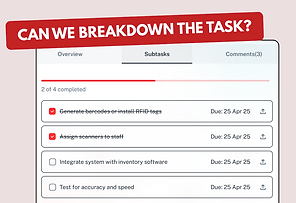
Subtasks allow you to divide larger tasks into smaller, actionable steps. This keeps everyone on track
The features that stood out to me are the project board and interactive flowcharts.
The project board has a great drag and drop experience to manage tasks visually across different stages, while the Interactive Flowcharts allow for team collaboration on workflows, making it easy to align the team in one board.

Ahmed Nasser
Senior Accountant
Enterprise risk management
Our Enterprise Risk Management platform provides a centralized hub to manage and mitigate risks across all departments and processes. With real-time tracking, detailed risk assessments, and customizable reporting, you can make informed decisions, ensure compliance, and safeguard your organization’s future. Whether it’s financial, operational, or compliance-related risks, our platform equips you to stay ahead of potential threats and drive business continuity.
Track your time and optimize productivity by monitoring task or subtask progress. Easily log time spent on tasks and monitor progress in real-time. Time tracking helps you stay within deadlines and optimize resource allocation, ensuring every minute counts.


The Calendar View offers a clear visual representation of your schedule, helping you track upcoming deadlines, meetings, and events. Sync with Google and Outlook calendars for seamless planning, ensuring you’re always prepared and organized.
Keep your deadlines and events in sync by connecting your calendar with Google and Outlook. This feature ensures you never miss a deadline and allows for easy scheduling of meetings and tasks.
Collaborate on flowcharts, diagrams, and brainstorming sessions in real-time.The interactive whiteboard lets you map out ideas and workflows with ease. Collaborate visually with your team, create dynamic diagrams, and organize complex processes—all in one space.


The project templates are so easy to use, and everything just flows smoothly.
I love having the digital notice board to keep everyone on the same page, it’s such a simple yet effective feature. And syncing calendars with google or outlook saves so much time.

Stanley Nyakwara
Bookkeeper I CPA Certified
Templates
Our collection of business templates gives you access to a wide variety of professionally designed, easy-to-use templates for all your business needs. From project management and financial tracking to marketing strategies and HR documents, these templates are fully customizable to match your unique requirements, helping you get started quickly and work smarter.
Quickly share files with your team and invite new members into projects to streamline collaboration. This feature ensures that everyone stays connected and updated, making teamwork seamless and efficient without any hassle.


Our AI chat feature allows you to engage directly with your documents, spreadsheets, presentations, and PDFs. Simply ask questions, and get instant, context-driven responses, helping you save time and work more efficiently by eliminating the need for manual searches.

The work management platform is Impressive
One feature that stood out to me is the ability to manage team projects visually, see tasks laid out clearly, and interact with everything seamlessly in a single application. This eliminates the hassle of switching between multiple tools and saves a lot of time.

Durojaye Olusegun
Cloud Security Expert
Our Story
Our journey began by addressing the challenges we faced in managing projects, risks and collaboration within our own team. As we worked to solve our own problems, we realized others were facing the same struggles. This led us to create a platform designed to streamline workflows, improve team communication. Overall our goal is to simplify project and risk management.
Can software be simple, straightforward, and easy, yet powerfully full-featured?
With Basecamp the answer is absolutely YES!
Can I manage multiple projects at once? Yes!
Is there a Kanban view for tracking tasks and progress? Yes!
Can I switch between a Kanban view and a list view? Yes!
Is real-time collaboration available on shared files? Yes!
Can I integrate my calendar with Google and Outlook for scheduling? Yes!
Can I invite team members into specific projects? Yes!
Can I track the time spent on tasks within the platform? Yes!
Can I @mention someone so they’re notified about something? Yes!
Can software be simple, straightforward, and easy ? Yes!
Can I customize my project templates? Yes!
Do you have I customizable file templates? Yes!
Does the platform allow AI-powered document interaction? Yes!
What problem are you trying to solve? As co founders who were previously working in consulting, we engaged in projects from healthcare to government agencies and the same problems kept reoccurring #1 Disjointed teams, workflows and SOPs which made completing any project and task cumbersome #2 Current project management platforms become to feature rich with un needed modules especially for non-technical users. #3 Established software vendors lacked the local insight and customer service needed to support our teams and projects with their templates
How does dimeri.ai protect my data. We follow best practices for data protection and privacy, ensuring compliance with South African laws and global privacy regulations. All data exchanged with our platform is securely encrypted. For more information on our privacy and security measures, please visit our Privacy Policy.
Are there hidden cost? No, DimensionalRisk is transparent about our pricing. The price you see is the price you pay. We do not charge any hidden fees or extra costs beyond the subscription fee. Additional costs may only apply for optional add-ons or premium features.
How secure is dimeri.ai? committed to protecting customer data. We build our platform using best practices for highly available, scalable, and secure cloud applications. Our security measures include encryption, access control, and continuous monitoring to ensure the safety and privacy of your data. We regularly assess and update our security protocols to ensure compliance with applicable laws and industry standards.
If I have more questions, how do i contact you? Simply email our cofounder pj@dimensionalrisk.com